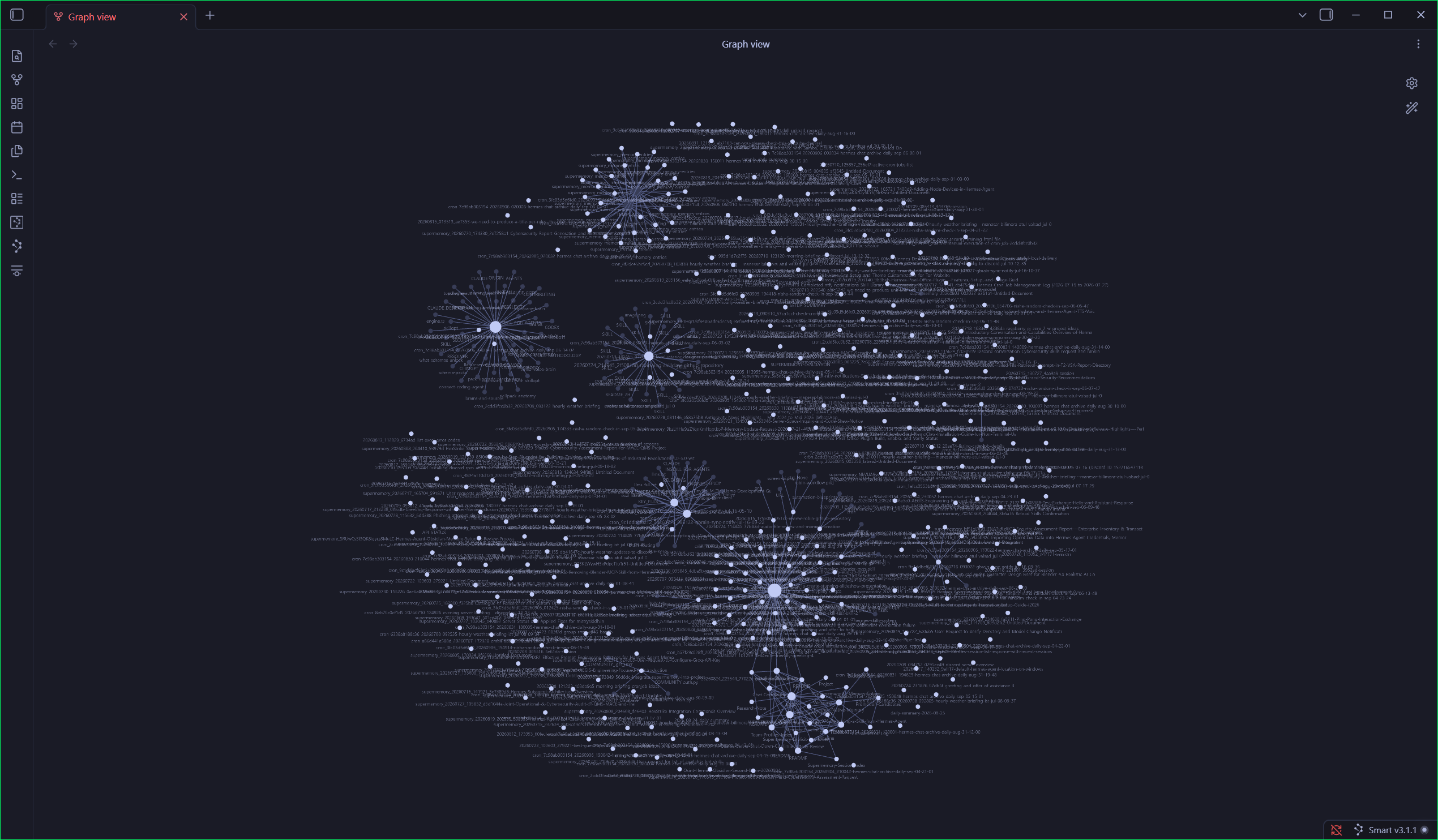
Hermes Brain: An Obsidian Second Brain Your AI Agent Can't Forget
An open-source vault template that archives every Hermes/OpenClaw session and lets you approve what becomes memory
 Siddh Mistry
October 30, 2026
Updated October 30, 2026
5 min read
Siddh Mistry
October 30, 2026
Updated October 30, 2026
5 min read
The Problem: Your Agent Remembers Everything, Except When It Matters
In my last post I walked through running OpenClaw on Hermes on my own hardware. It works well, but after a few weeks I hit the same two annoyances over and over:
- Context lived in chat logs I would never scroll back through. A good decision made in a session three weeks ago was effectively gone.
- Agent memory was a black box. Whatever the agent decided to remember, it remembered. I had no easy way to see it, question it, or say “no, that’s wrong.”
So I built Hermes Brain: an Obsidian vault template that sits next to your agent and turns every session into plain, searchable markdown, with a human-in-the-loop step before anything becomes permanent memory.
It is free, MIT-licensed, and lives here: github.com/mistrysiddh/hermes-brain-template.
How It Works
The core idea is a three-stage pipeline:
1 | 04-Archives/Daily/YYYY/MM/DD/*.md → 04-Archives/Memory-Review/*.md → Hermes MEMORY.md / USER.md |
- Archive. An hourly job dumps every Hermes session to markdown. Sessions are deduplicated and scrubbed for secrets on the way in.
- Stage. Facts worth remembering are written as candidates into a review folder. Nothing is promoted automatically.
- Promote. You read the candidates (in Obsidian, or via
promote_memory.py --review) and approve the ones you want. Only then do they reach the agent’s real, durable memory.
That last step is the whole point. Your agent gets a memory, and you keep the editor’s pen.
What’s Inside the Vault
The vault follows the PARA method (Projects, Areas, Resources, Archives) plus a _System/ folder for the machinery:
| Folder | What lives there |
|---|---|
01-Projects/ |
Active projects, architecture decision records, a Dataview-powered project database |
02-Areas/ |
Your user profile, installed skills index, team profiles, lessons learned |
03-Resources/ |
Maps of content (AI/ML, Cybersecurity, Agentic Architecture, Tech Stack), guides, research |
04-Archives/ |
Daily session archive, timeline, memory-review staging and a Kanban board |
_System/ |
Templates, canvases, and the cross-platform scripts |
It also ships preconfigured with the Dataview, Kanban, Local REST API and Smart Connections plugins, two themes (Tokyo Night and Nemoclaw), a graph view with colour-coded folders so it is actually readable, and a Dashboard.md showing token usage, archiver health, recent sessions and skill analytics.
There is even a bundled MCP server (hermes_brain_mcp.py) that exposes the vault to agents through tools like vault_search, read_note and stage_memory_candidate.
Why Not Just Use a Vector-DB Memory Service?
You can, and for some uses it is the right call. Here is where I think this approach wins:
| Hermes Brain | Raw chat logs | Vector-DB memory | Generic Obsidian | |
|---|---|---|---|---|
| Human review before “memory” | ✅ | ❌ | ❌ | N/A |
| Readable without special tooling | ✅ | ✅ (unstructured) | ❌ | ✅ |
| No vendor lock-in | ✅ | ✅ | ❌ | ✅ |
| Agent-usage analytics | ✅ | ❌ | Varies | ❌ |
| Wired up for a Hermes agent | ✅ | N/A | ❌ | ❌ |
If you want automatic semantic recall with zero supervision, use a vector DB. If you want to see and approve what your agent knows, in files you already own, this is for you.
Installing It
There are several ways in. Pick whichever matches how you work.
One-line install (Linux, macOS, WSL)
1 | curl -fsSL https://raw.githubusercontent.com/mistrysiddh/hermes-brain-template/main/_System/Scripts/Installers/install.sh | bash |
Windows has an equivalent irm ... | iex one-liner in the README. As with any pipe-to-shell installer, read the script first if you are cautious. It is a plain bash script in the repo.
Clone and run
1 | git clone https://github.com/mistrysiddh/hermes-brain-template.git my-second-brain |
Verify it works (no Hermes needed)
1 | python _System/Scripts/hermes_brain_mcp.py --test # ends with "All hermes-brain-mcp self-tests PASSED" |
Other options
- One paste into Hermes. Open
INSTALL_PROMPT.mdand paste the master prompt into your Hermes chat. It installs the vault and sets up the hourly archive cron job in one go. - Scratch vault.
try.sh/try.ps1copies the template into a temp folder so you can poke around without touching your real config. - GitHub Codespaces. Zero local setup if you just want to look.
The installers are careful about your data: they skip 02-Areas/User-Profile.md if you have already filled it in, and update.sh refreshes scripts and templates without touching your Daily/ or Memory-Review/ content.
Privacy and Safety Notes
A second brain full of agent transcripts is sensitive by nature, so a few things worth knowing:
- The repo ships structure only. No chat history, no keys, no personal data. A
personal-data-guardGitHub workflow exists specifically to catch accidental leaks. Daily/,Memory-Review/,.smart-env/and plugindata.jsonfiles are git-ignored by default.- The Local REST API plugin generates its own key. Keep it in your agent’s protected environment, never in a note.
- Run one archiving cron job per vault. Two writers to the manifest will corrupt the index.
Do I Need Hermes or a Local LLM?
No to the LLM: the core archive and review pipeline needs no local models. Only the optional trend-digest scripts want Ollama or sentence-transformers.
And no to Hermes, if you only want the vault: the structure, templates, Dataview queries and Kanban boards work as a standalone Obsidian second brain. The automatic archiving simply needs a Hermes or OpenClaw agent to feed it.
Try It, Break It, Tell Me What’s Missing
This is a young project and I would love feedback:
- ⭐ Star the repo so more people find it
- 🐛 Open an issue for bugs or rough edges
- 💬 Use Discussions for questions and feature ideas
- 🌐 Take the interactive tour on the showcase site
- 📺 Watch the install walkthrough on YouTube
If you run a Hermes or OpenClaw agent, give it a memory you can read. You will be surprised how much useful context was quietly disappearing.
Related Documents
Other specifications filed under the same module.
 DWG-04592
MOD-09 · Self Hosting
DWG-04592
MOD-09 · Self Hosting
I Built My Own Self-Hosted AI Assistant (No OpenAI Subscription Needed)
A practical walkthrough of building a self-hosted AI assistant using OpenClaw and Hermes — no cloud subscriptions, no vendor lock-in, full control over your data.
Siddh Mistry
·
Sep 06, 2026
 DWG-83716
MOD-09 · Self Hosting
DWG-83716
MOD-09 · Self Hosting
Changing Site
What is the reason of changing me site from wordpress to headless cms?
Siddh Mistry
·
Dec 12, 2020
Field Notes & Comments
Session-local discussion — comments here are not persisted to a server in this build.
Loading discussion module…